
inecta AI · inecta AI Agents
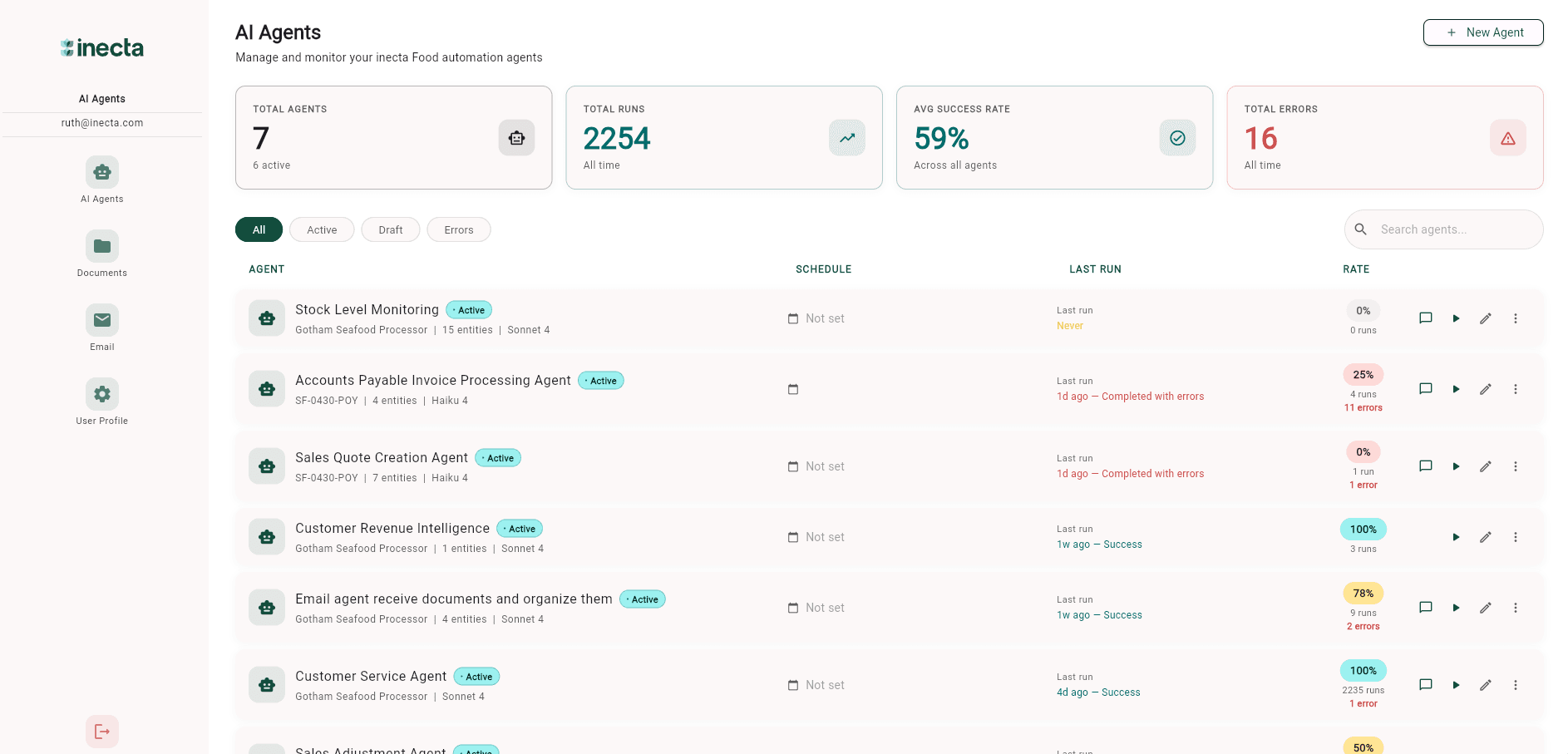
Agents that monitor, act, and report — inside Business Central.
Monitor ERP data, connect outside sources, run on triggers, and write back to Business Central — with the permissions, audit trail, and controls of a system of record.
- Available for Microsoft Dynamics 365 Business Central
- Permissions, audit, and controls built in
- Configurable per agent
- Built for Microsoft Dynamics 365 Business Central
- Configurable per agent
- ERP permissions and approvals
- Usage controls and audit history
WHAT IT DOES
Not just chat. AI that works inside your ERP.
Most ERP AI helps people ask questions. inecta AI Agents go further — observing conditions, acting within permissions, and reporting back with context.
Observe
Monitor ERP data, emails, external sources, schedules, and operational conditions.
Act
Take approved actions inside Business Central within the permissions and limits you define.
Report
Summarize exceptions, explain what changed, and send recurring updates to the right people.
CAPABILITIES
Build agents that watch the business for you
Manual, chat, email, and scheduled triggers
Run an agent on demand, from a chat endpoint, when an email arrives, or on a recurring schedule.
ERP entity awareness
Agents understand Business Central and inecta Food ERP entities, not just generic documents.
Configurable permissions
Decide which entities an agent can reach, scoped per agent rather than all-or-nothing.
Read and write access where approved
Agents can read across permitted entities and write back where you have explicitly allowed it.
External data connections
Connect agents to web search, news feeds, APIs, MCPs, and other approved outside sources.
Multiple model options
Choose a model per agent based on cost, complexity, and the task at hand.
Audit and run history
Every run is logged with inputs, actions, and outcomes for review and accountability.
You control every cost driver
The model an agent uses, how often it runs, how much data it touches, and how long its instructions are — all in your control.
Usage and cost visibility
Per-agent usage and cost dashboards are on the roadmap.
Read-only and action-enabled modes
Run an agent read-only or action-enabled today; formal approval-required gating is on the roadmap.
GOVERNANCE AND TRUST
Autonomy where it helps. Approval where it matters.
ERP teams are right to be careful about autonomous AI writing into a system of record. inecta AI Agents are built so you decide how far an agent can go — and can prove what it did.
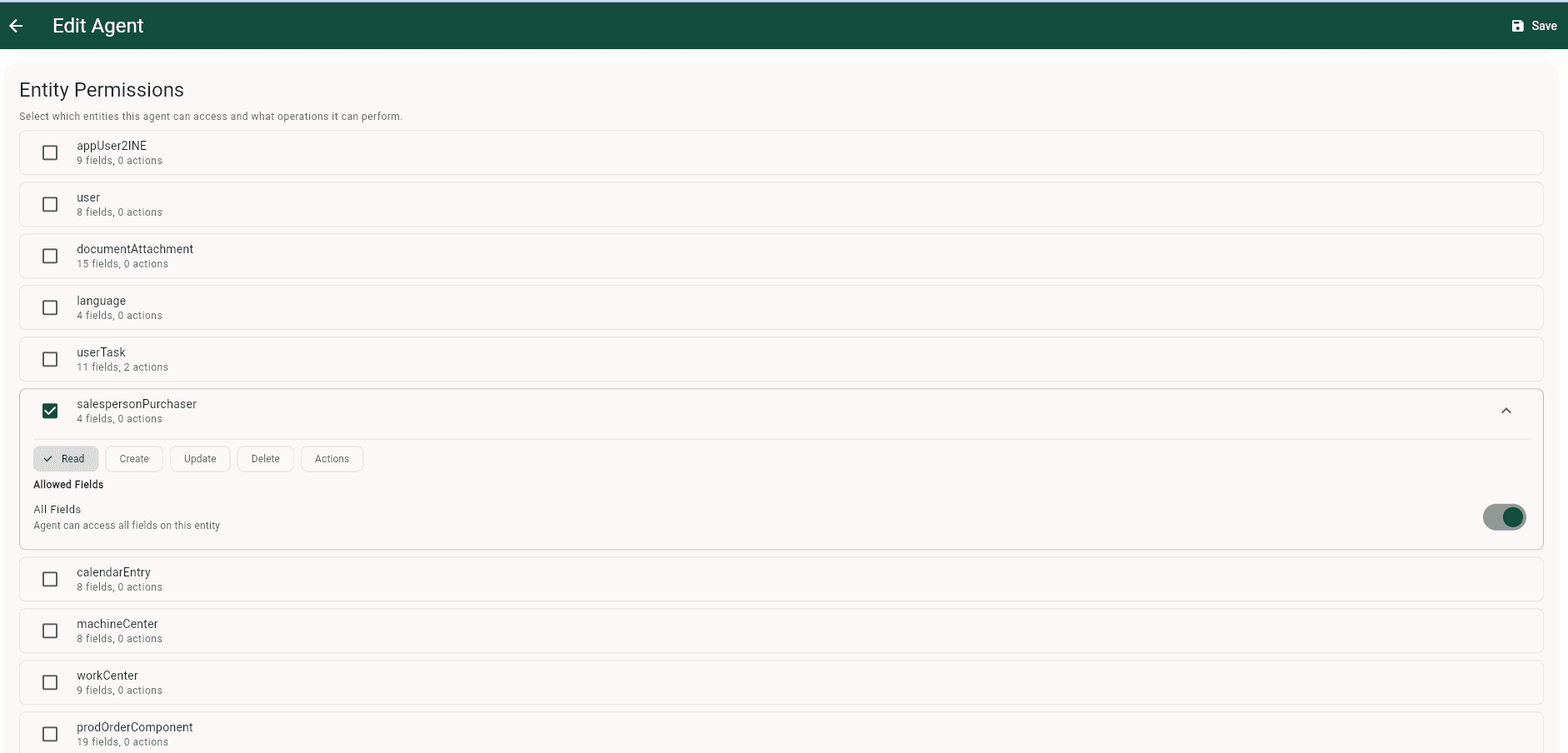
Read-only mode
The agent can observe and report but never writes back to the ERP.
Approval-required mode
On the roadmap: the agent proposes actions and a person approves before anything is written.
Action-enabled mode
The agent acts within its permitted entities and the limits you set.
Controls built in
- Role-based entity permissions
- Entity-level scope
- Read-only and action-enabled modes
- Per-agent model selection
- Audit logs and run history
- Tenant data isolation
Coming in early access
- Usage dashboards
- Budget alerts
- Approval workflows for high-impact actions
HOW IT WORKS
From idea to a governed agent in six steps
- 1
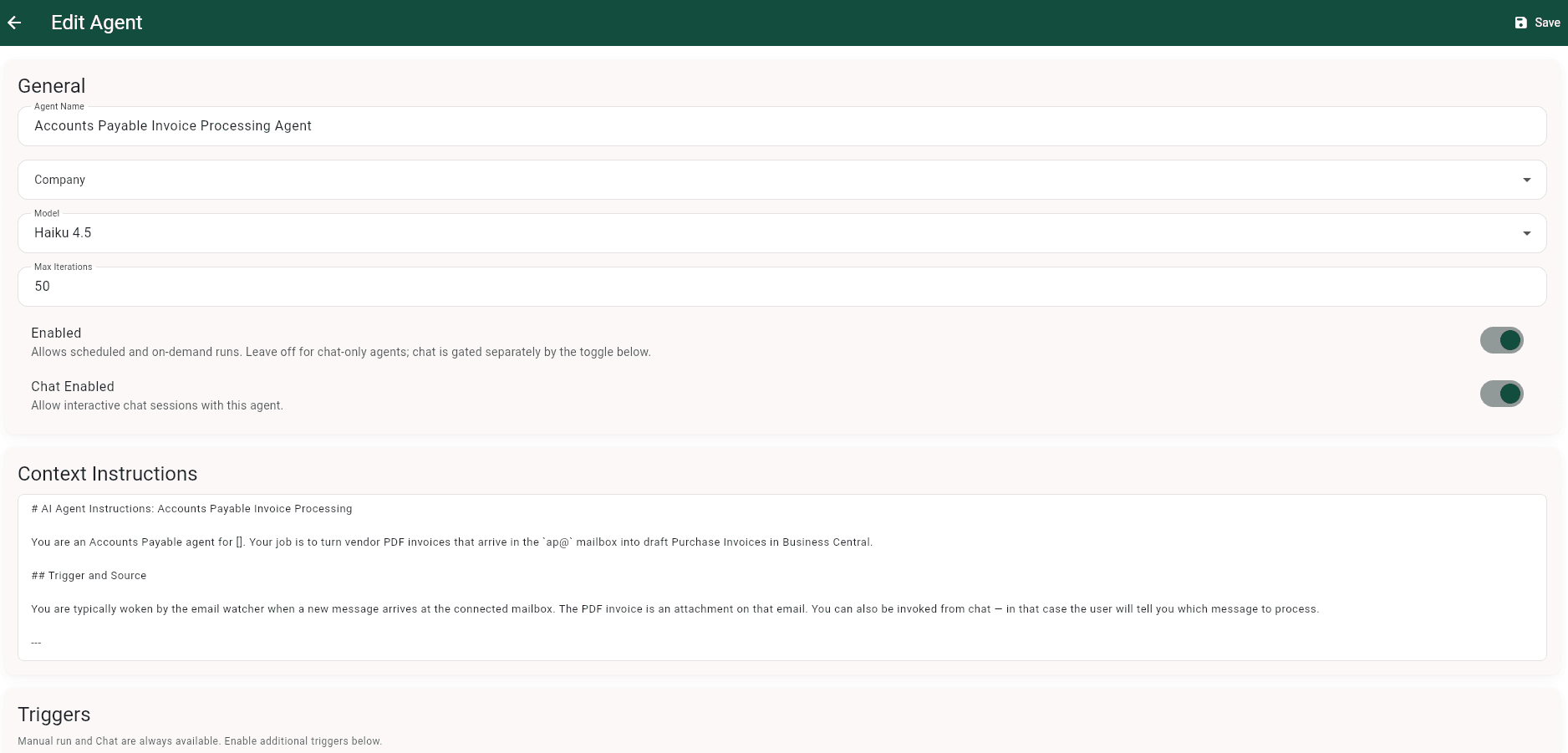
Define the agent
Give the agent a clear business purpose and the instructions it should follow.
- 2
Set permissions
Choose which Business Central or inecta Food ERP entities it can read or write.
- 3
Choose triggers
Run it manually, from chat, on an email watcher, or on a schedule.
- 4
Select a model
Pick the model that fits the task by cost, complexity, and type.
- 5
Review output
Track runs, results, usage, and cost from a single place.
- 6
Add approval gates
Require human approval before any high-impact or sensitive action.
PRODUCT IN ACTION
An AP Invoice Processing Agent at work
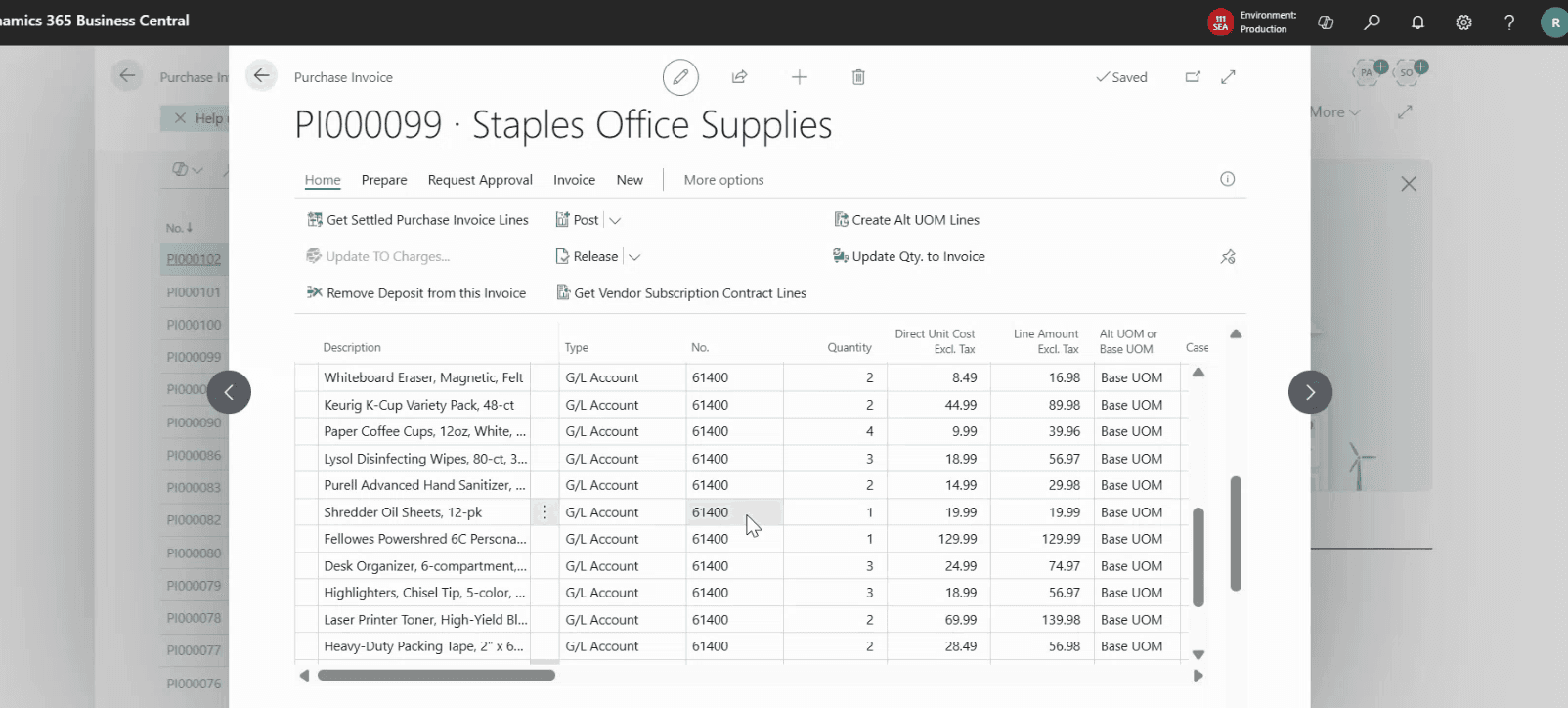
Triggered by an email watcher, the agent reads each PDF invoice, looks up the vendor, and drops a draft purchase invoice into Business Central — ready for an AP clerk to review and post.
USE CASES
Where teams put agents to work
Business Central
Finance agent
Monitor overdue invoices, unusual payment behavior, cash collection risks, and AP exceptions.
Purchasing agent
Watch vendor delays, price changes, open purchase orders, and inventory risk.
Inventory agent
Flag stockout risk, slow-moving inventory, negative inventory, or unusual demand changes.
Sales agent
Summarize customer activity, detect margin erosion, and alert teams to account risks.
Operations agent
Monitor late orders, bottlenecks, exception queues, and process delays.
Executive reporting agent
Send weekly summaries of risks, anomalies, wins, and recommended follow-ups.
inecta Food ERP
QC agent
Monitor failed quality tests, open holds, supplier quality trends, and unresolved corrective actions.
Lot traceability agent
Summarize related receipts, production, shipments, and affected customers during a lot investigation.
Catch weight agent
Flag unusual yield, weight variance, or margin impact.
EDI agent
Monitor failed documents, repeated trading partner issues, or missing acknowledgments.
Production agent
Watch production orders, shortages, delays, and capacity risks.
Customer service agent
Summarize customer issues, order history, shipment status, and open exceptions.
INTEGRATIONS
Built to connect — triggers, endpoints, mailboxes, and outside data
Every agent has its own set of triggers and integration points. Pick the ones it needs, leave the rest off.
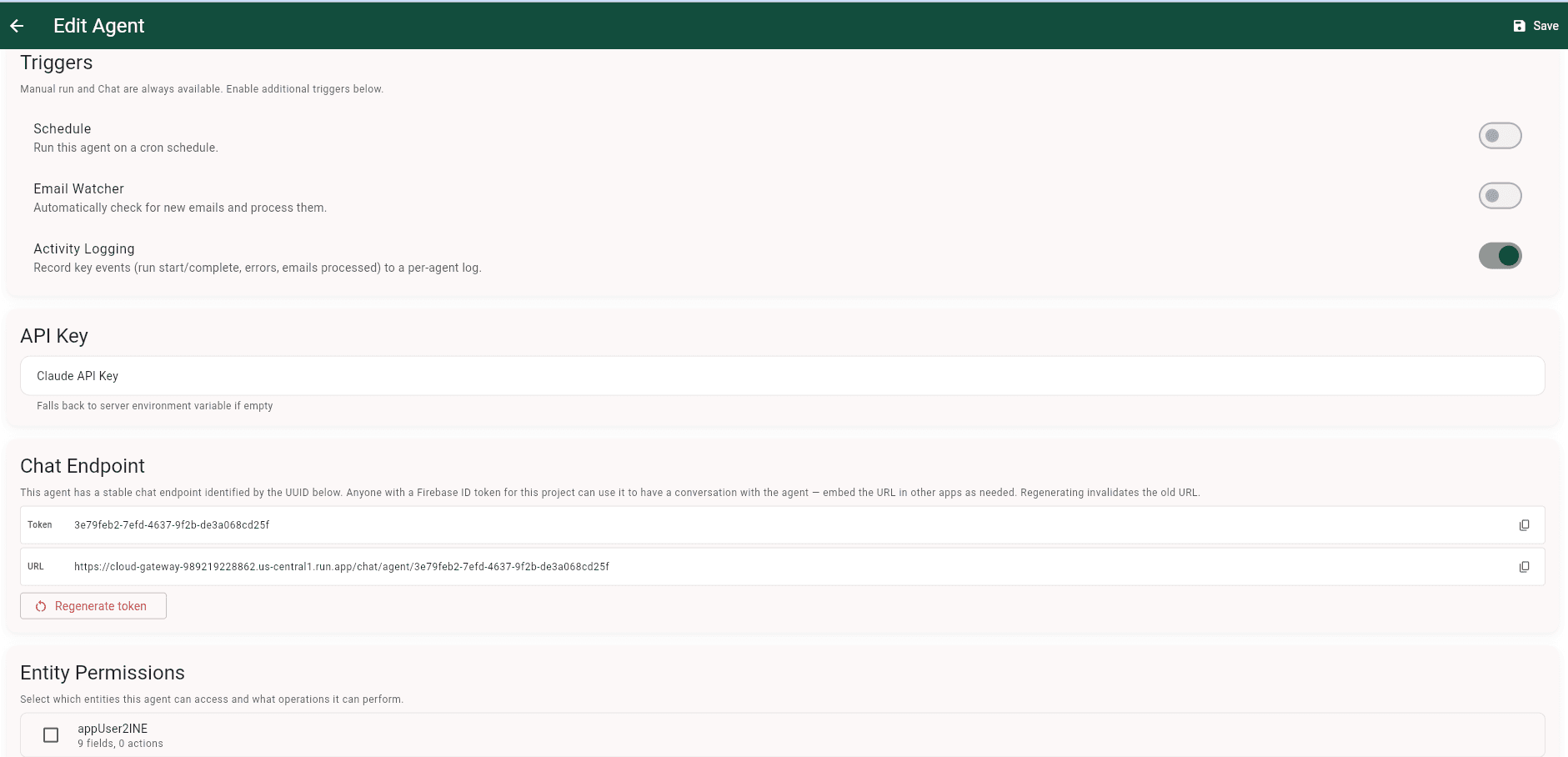
Run an agent on a cron schedule, watch a mailbox for new messages, log every run, and expose a stable chat endpoint other apps can call.
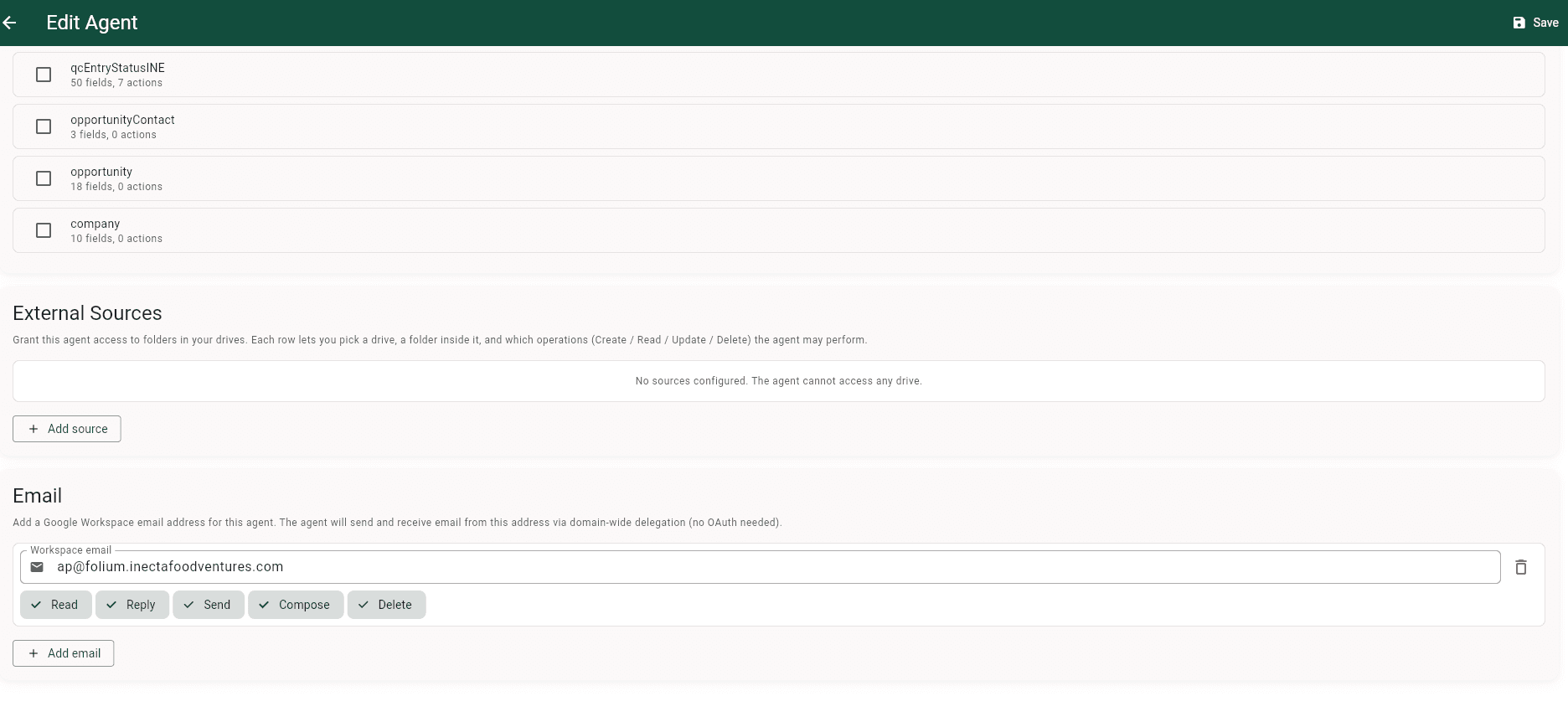
Grant scoped access to drive folders and an outside Google Workspace mailbox so agents can read, draft, and send email inside the boundaries you set.
FOR INECTA FOOD ERP CUSTOMERS
inecta Food ERP, powered by inecta AI
inecta AI Agents work natively with inecta Food ERP — helping food and beverage teams monitor QC, lot traceability, catch weight, production, EDI, inventory, purchasing, and customer service workflows.
Explore inecta Food ERPCHAT
Ask your data in plain English
Every agent exposes a chat endpoint alongside its scheduled and email triggers. Open a conversation and ask anything your ERP data can answer — outstanding AP for a vendor, top customers by revenue, lots about to expire. The agent pulls live values, does the math, and explains what it found.
- Plain English in, structured answers out
- Reads from the entities the agent is permitted to access
- Surfaces things a glance at a report can miss — like duplicate vendor invoices
PRICING
A flat platform fee, plus usage-based AI you control
inecta AI is a flat tenant subscription that includes the full platform, plus usage-based billing for the AI your agents actually consume. Every cost driver — the model an agent uses, how often it runs, how much data it touches, and how long its instructions are — is in your control. Setup and implementation are scoped separately.
Part 1
Flat tenant subscription
One tenant-level subscription includes the full platform — every model, every trigger type, and the full entity catalog. No tiers.
Part 2
Usage-based AI
On top of the subscription, you pay for the AI your agents actually use, billed as usage.
You control every cost driver
You choose the model
Run an agent on a lighter or heavier model per task — cost follows the model you pick.
You set scope and triggers
How often an agent runs, how much data it touches, and how long its instructions are — all yours to set.
Visibility and alerts
Per-agent usage dashboards and budget alerts are on the roadmap.
Put inecta AI Agents to work in your Business Central
See how inecta AI Agents fit your Business Central environment. We will walk through the workflows, triggers, permissions, and audit controls that matter for your team — and show you what an agent looks like running against live ERP data.
FREQUENTLY ASKED QUESTIONS
inecta AI Agents, answered
inecta AI is the umbrella product line that brings AI agents and automation into Microsoft Dynamics 365 Business Central. inecta AI Agents is the first product in that line.
inecta AI Agents are configurable agents that monitor ERP data, connect to outside sources, run on triggers, and take approved actions inside Business Central — with permissions, audit history, and the right controls in place.
No. inecta AI Agents is available for any Microsoft Dynamics 365 Business Central environment. The agents are designed around Business Central entities and workflows, with deeper out-of-the-box knowledge of inecta Food ERP workflows for food and beverage customers.
Yes. The product is designed around Business Central business workflows and entities, so it works with any Business Central environment. Talk to sales about scoping for your setup.
Microsoft provides broad Copilot and agent-building capabilities across its ecosystem. inecta AI Agents are designed around Business Central business workflows, ERP entity permissions, operational triggers, audit history, and industry-specific process knowledge for inecta Food ERP customers.
Copilot Studio is a general platform for building agents. With inecta AI Agents, the Business Central entity awareness, permissions, triggers, and audit history come built around ERP workflows, so teams configure agents rather than assemble that context themselves.
Yes, where you explicitly allow it. Write access is granted per entity and per operation. Formal approval gating for sensitive writebacks is on the roadmap.
Yes. Grant an agent read-only entity permissions and it observes and reports without writing back to the ERP.
You can scope an agent to read-only or to specific entities and operations today. Formal approval-required gating for high-impact actions is on the roadmap — talk to sales about your requirements.
inecta AI is a flat tenant subscription that includes the full platform — every model, every trigger type, and the full entity catalog — plus usage-based billing for the AI your agents actually consume. Every cost driver is in your control. Setup and implementation are scoped separately.
The subscription is flat. The usage-based portion scales with what your agents do, and you control every driver — the model an agent uses, how often it runs, how much data it touches, and how long its instructions are. Per-agent usage dashboards and budget alerts are on the roadmap.
Yes — by design you control every cost driver: the model each agent uses, run frequency, data scope, and instruction length. Per-agent usage dashboards and budget alerts are on the roadmap. Talk to sales about controls for your environment.
Activity and runs are visible per agent in the agent log today. Per-agent usage and cost dashboards are on the roadmap.
Each agent is configured to run on a specific Claude model, chosen per agent for cost and capability. Broader admin-level model governance is on the roadmap.
Each agent reaches only the Business Central or inecta Food ERP entities you permit, scoped per agent with role-based permissions and data boundaries.
Yes. Agents can connect to approved external sources such as web search, news feeds, APIs, MCPs, and other connectors.
Setup effort depends on your environment and the workflows you want to automate. Implementation and services are scoped separately when needed.
RELATED PAGES
Explore the inecta platform
inecta Food ERP
The complete food and beverage ERP, built on Microsoft Dynamics 365 Business Central — and the first home for inecta AI Agents.
Learn more →Microsoft Dynamics 365 Business Central
How inecta builds on Business Central as the platform that runs your business.
Learn more →Food Traceability Software
Lot-level traceability from raw materials to finished goods, with audit-ready records.
Learn more →What Is ERP?
A plain-language primer on ERP and why it is the system of record agents act on.
Learn more →